

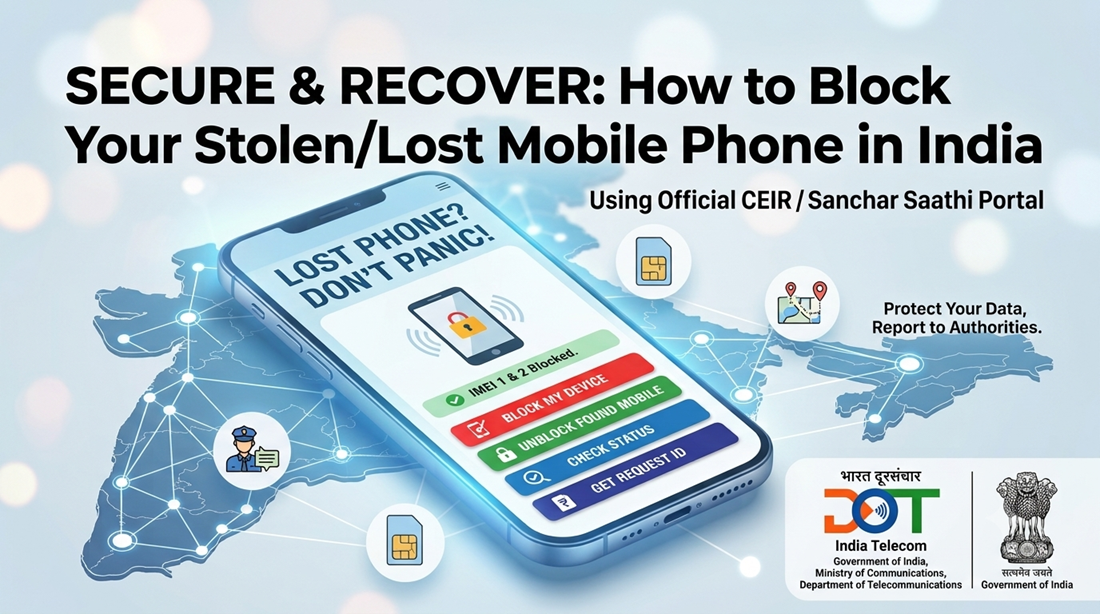
Lost Your Phone? Don’t Panic: How to Instantly Block Stolen/Lost Mobile Phone in India
Few things cause that immediate sinking feeling quite like reaching into your pocket or bag and realizing your mobile phone is gone. Today, our smartphones are more than just communication tools—they are digital vaults holding UPI payment apps, bank details, passwords, personal photos, and sensitive identification records. Knowing the exact steps to block stolen/lost mobile phone devices across India is essential to protect your personal identity and financial safety.
Fortunately, the Department of Telecommunications (DoT) under the Ministry of Communications, Government of India, offers a citizen-centric platform: the Central Equipment Identity Register (CEIR), integrated into the Sanchar Saathi initiative. This system allows any Indian mobile user to remotely block the International Mobile Equipment Identity (IMEI) number of a misplaced or stolen device, rendering the physical handset completely useless across all telecom service providers nationwide.
Why Immediate Blocking via CEIR Matters
When a smartphone is stolen, perpetrators/ fraudsters often discard the SIM card immediately or attempt to alter and clone the IMEI to resell the handset. The CEIR system directly counters this:
- Nationwide Network Blacklisting: Once reported, the IMEI is blocked across all Indian telecom networks (Airtel, Jio, Vi, BSNL) within 24 hours. Even if someone inserts a brand-new SIM card, the phone cannot connect to voice, SMS, or data services.
- Active Police Traceability: Whenever someone attempts to turn on the blocked handset or insert another SIM card, the CEIR system captures the network activity and relays traceability data to the concerned police station for recovery.
- Preservation of Cloned Devices: Legitimate devices sharing an accidentally cloned IMEI are safely placed on an override list so genuine users do not lose network connectivity.
Step 0: Essential Prerequisites Before You Start
Before opening the CEIR portal, prepare three critical requirements:
- Duplicate SIM Card: Visit your telecom service provider (TSP) store and obtain a replacement SIM for the mobile number that was inside the lost device. You will need active SMS service on this number to receive mandatory One-Time Passwords (OTPs) during verification.
- Police Complaint Report: File a First Information Report (FIR) or Lost Report (LR) at your nearest police station or via your state police online portal. Note down the complaint number and keep a digital copy (PDF or image) ready for upload.
- Valid Identity Proof: Keep a clear scanned copy or photo of your government-issued ID proof handy (such as a Voter ID, Driving Licence, or other recognized photo identification).
- Purchase Invoice (Optional): If you still have the original mobile purchase receipt or invoice, keep a copy ready to upload.
Step-by-Step Guide: Blocking Your Lost or Stolen Mobile
Follow these steps to submit your blocking request on the official portal:
Step 1: Access the Official Portal
Navigate to www.ceir.gov.in or https://www.sancharsaathi.gov.in on any browser. You can also download the official Sanchar Saathi Mobile App from the Google Play Store or Apple App Store.
On the homepage, locate the four primary navigation buttons:
- Block Stolen/Lost Mobile (Red Tab)
- Un-Block Found Mobile (Green Tab)
- Check Request Status (Blue Tab)
- Forgot Request ID (Indigo Tab)
Click directly on the red tab: “Block Stolen/Lost Mobile”.
Step 2: Fill Out the Online Registration Form
The portal displays an online submission form divided into three structured sections:
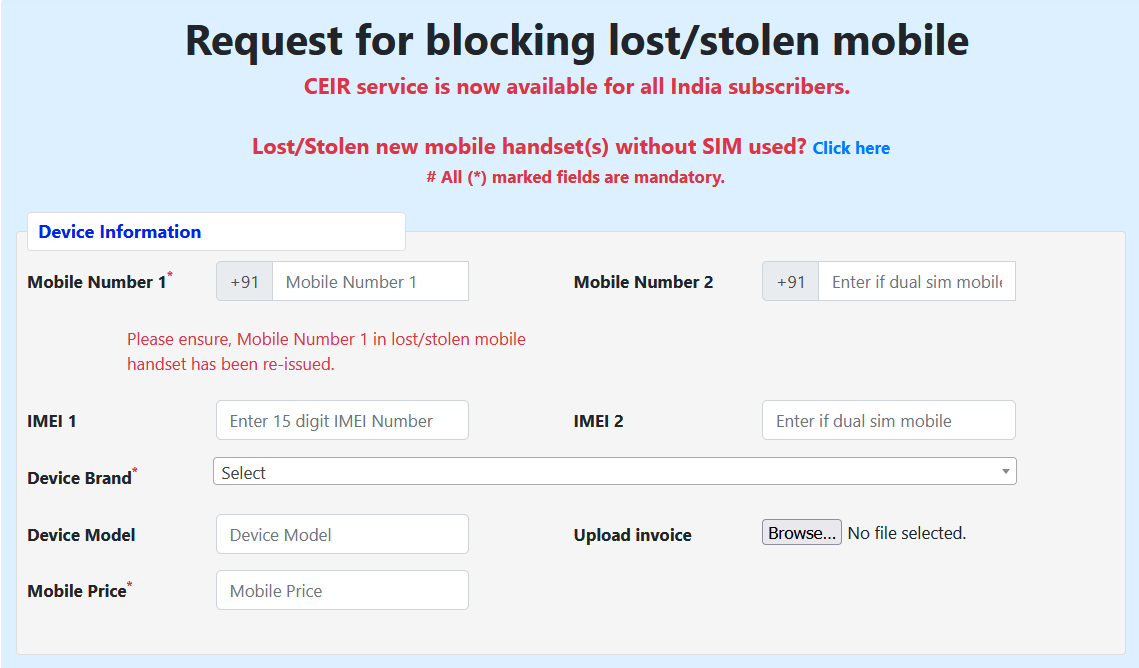
- Device Information:
-
- Enter Mobile Number 1 (ensure this SIM has been re-issued so it can receive messages) and Mobile Number 2 if using a dual-SIM phone.
- Provide the 15-digit IMEI 1 (and IMEI 2 if applicable).
- Select your device brand, device model, and approximate mobile purchase price.
- Upload the mobile purchase invoice if available
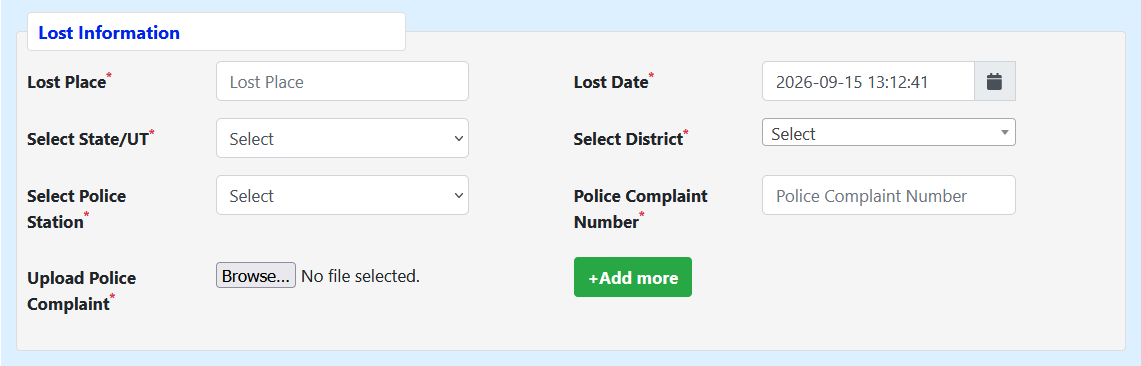
- Lost Information:
-
- Enter the location where the device went missing (Lost Place) and select the date and approximate time.
- Select the relevant State/UT, District, and specific Police Station jurisdiction.
- Enter the Police Complaint Number and upload the digital copy of the FIR/LR.
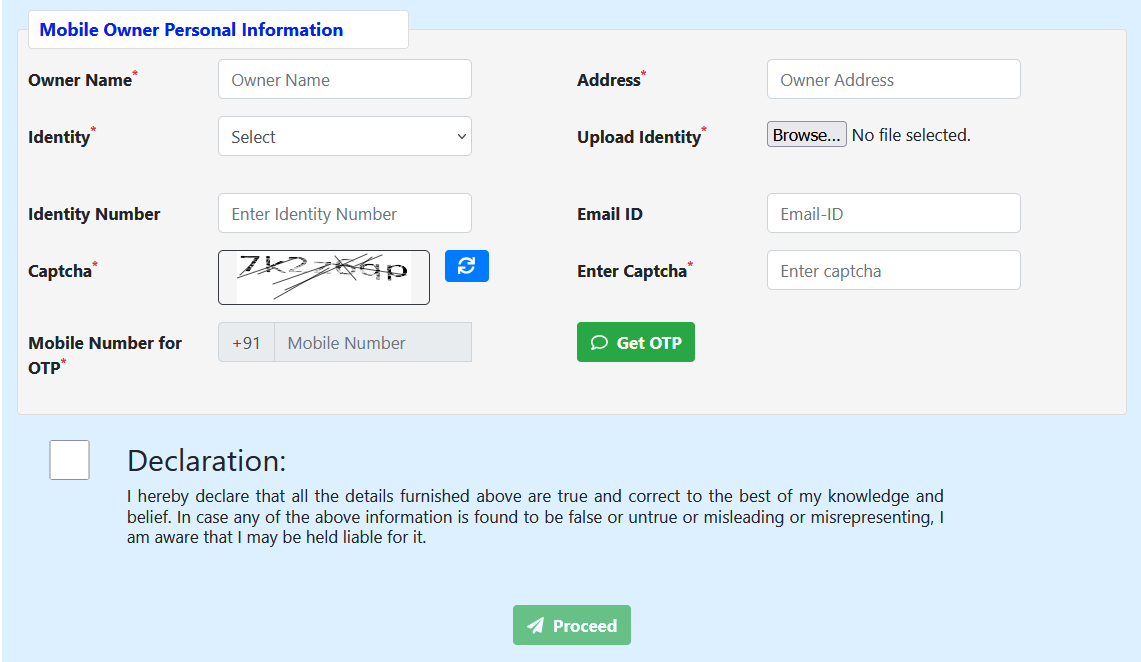
- Mobile Owner Personal Information:
-
- Enter the full name and address of the registered owner.
- Select the ID type, enter the corresponding ID identification number, and upload the identity document.
- Provide an alternate email address for correspondence.
- Enter the mobile number designated to receive the verification OTP, type the Captcha code shown, and click “Get OTP”.
Step 3: Verify OTP and Record Your Request ID
Enter the received OTP, select the statutory declaration checkbox confirming the authenticity of your submission, and click “Proceed”.
Upon successful verification, the screen confirms that your blocking request has been accepted. Your phone’s IMEI will be blocked across all service provider networks within 24 hours.
Important: Securely save the auto-generated 18-digit Request ID. You will need this unique number to check tracing updates or to restore service once the phone is recovered.
How to Check the Status of Your Request
You can track whether your device has been blocked and check real-time traceability updates:
- Go to the CEIR or Sanchar Saathi homepage and select the blue tab “Check Request Status”.
- Enter your 18-digit Request ID (or Police Complaint Number where integrated) and complete the Captcha.
- Click “Submit”.
- The dashboard displays the operational status (e.g., “Blocking Request is successfully processed”). When tracking signals are picked up, it reveals the relevant police station, district, and exact timestamps when the device attempted a network handshake.
What to Do If You Recover Your Phone: How to Unblock It
If local law enforcement recovers your phone or you find it yourself, you must unblock the IMEI before using it again.
- Return to the portal homepage and click the green tab “Un-Block Found Mobile”.
- Enter your original Request ID.
- Enter the mobile phone number used during initial registration.
- Select the Reason for Un-blocking (such as “Recovered by police” or “Found by self”).
- Enter the Captcha, click “Get OTP”, verify the code, and submit the request.
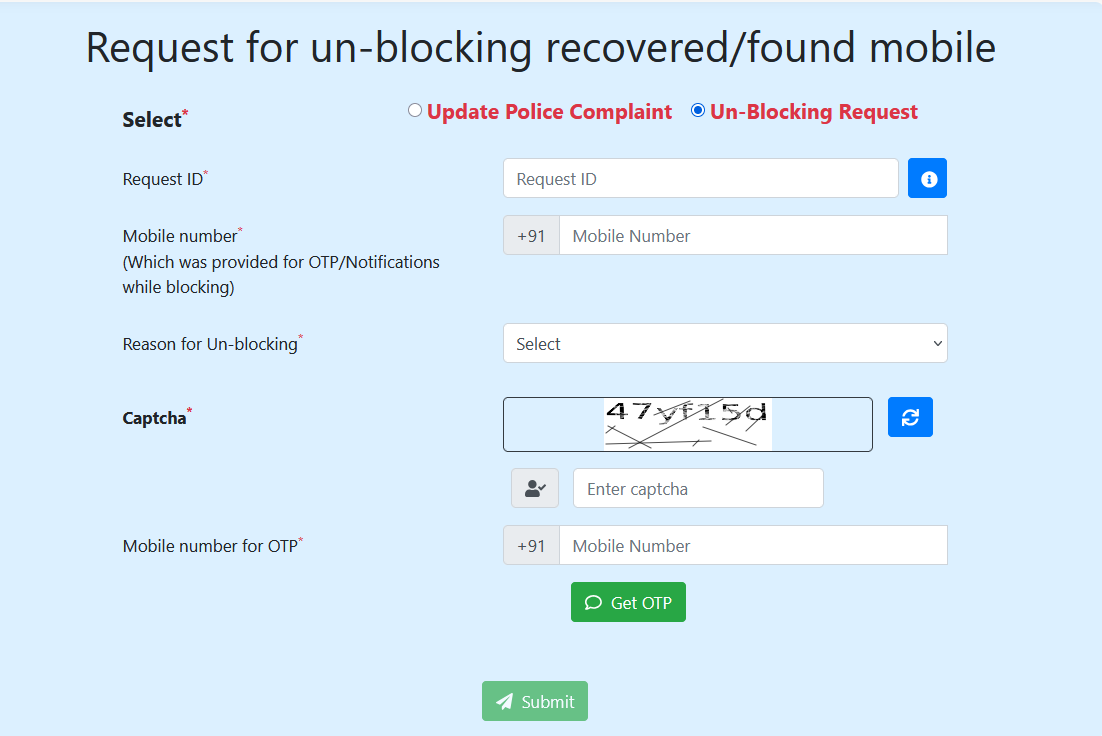
Once confirmed, the portal automatically transmits unblocking instructions to all telecom operators, restoring standard calling and mobile internet functionality.
Bonus Tip: Verify Handset Authenticity (KYM Service)
To safeguard against buying stolen or blacklisted second-hand phones, use the Know Your Mobile (KYM) verification tool before purchasing any used device:
- Via SMS: Text KYM <15-digit IMEI> to 14422. You will receive an instant reply showing manufacturer details, model names, and whether the device is marked valid, duplicate, or blacklisted.
- Via Sanchar Saathi App: Open the app, select “Know Genuineness of Your Mobile Handset”, and manually enter or scan the IMEI barcode.
- Via Web Portal: Open the web portal, navigate to the KYM section, verify your mobile number with an OTP, and check the target IMEI status.
Quick Troubleshooting: Lost Your Request ID?
If you misplace your 18-digit Request ID, click the indigo tab “Forgot Request ID” on the CEIR homepage. Enter your registered contact number and complete the Captcha. After entering the verification OTP, the system displays all active Request IDs associated with your mobile number.
Losing a mobile device is stressful, but acting promptly prevents digital identity misuse and helps authorities recover your hardware. Bookmark the official Sanchar Saathi portal today so you are always prepared.
Leave a Reply