

Is Your Aadhaar Secretly Linked to 9 SIMs? Use This 2-Minute Audit to Find Out – Aadhaar Sim Cards Fraud
We’ve all been there. You’re at a hotel check-in desk, or a local mobile shop, and the clerk asks for it: “Sir, Aadhaar card photocopy please.” We hand it over without a second thought. It’s the “entry tax” for living in digital India. We trust the system, we trust the person behind the counter, and we move on. But while you’re going about your day, that single piece of paper might be starting a second life you know nothing about. The “Hidden Shadow” on Rohan’s Aadhaar: A Story of Digital Survival
The “Hidden Shadow”: Rohan’s Story
Rohan, a 30-year-old professional who considered himself “tech-savvy.” He used two-factor authentication, strong passwords, and never clicked on suspicious links. He thought his digital fortress was impenetrable.
Then, on a quiet Tuesday afternoon, Rohan received a routine alert from the Department of Telecommunications (DoT). It mentioned he had 8 active mobile connections linked to his Aadhaar.
Rohan’s heart dropped. “Eight? I have my personal phone and my work phone. That’s two. Who on earth has the other six?”
Suddenly, the memory of every photocopy he’d ever handed out felt like a ticking time bomb. If one of those “shadow” numbers was used for an online scam or an extortion call, the digital trail wouldn’t lead to a faceless criminal—it would lead straight to Rohan’s front door.
Why We Should Be Worried
In the eyes of the law, the person who owns the SIM is the first person questioned when a crime occurs. Scammers hunt for “clean” IDs like yours to:
- Bank Fraud & OTP Scams: They use these numbers to receive OTPs and drain accounts.
- Provide Anonymity for Organized Crime: From illegal operations to threats, your ID acts as their bulletproof vest.
- Exploit the “9-SIM” Rule: In India, you are allowed a maximum of 9 mobile connections. Scammers know people often have only 1-2, leaving 7 slots “open” for abuse.
When the police knock, they don’t look for the guy who used the SIM; they look for the person who owns the SIM.
The 10-Minute Rescue Mission: How Rohan Took Control
Rohan didn’t wait for a police knock. He used the TAFCOP (Telecom Analytics for Fraud Management and Consumer Protection) portal—a free, official government tool designed to hand the power back to the citizens. Here is the exact process he used to “delete” his shadow identity.
Step-by-Step process used by Rohan to deactivate the fake SIMs issued on his name within 10 minutes.
1. Visit the Source
Rohan ignored the links in his SMS (smart move!) and typed the address directly into his browser: tafcop.sancharsaathi.gov.in.
Note: Always look for the .gov.in suffix. If it’s not there, it’s not the government.
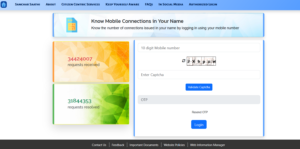
2. The Secure Login
- Enter your primary active mobile number (the one that is actually linked to your Aadhaar).
- Complete the Captcha code challenge.
- Click ‘Validate Captcha’. You will instantly receive a 6-digit OTP.
- Enter the OTP and click ‘Login’.
3. The Moment of Truth (The Dashboard)
Once the dashboard loaded, Rohan saw the “Ghost Gallery.” It was a list of every number linked to his Aadhaar.
- The Familiar: His personal and work numbers.
- The Ghost: A college number he forgot to deactivate years ago.
- The Fraud: Five numbers he had never seen before, registered in states he hadn’t visited in a decade.
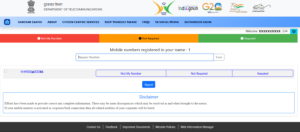
Note: Always carefully review every single number listed in the dashboard list.
4. Reporting the Fraud
Rohan didn’t need a lawyer or a police station.
- For the five numbers Rohan didn’t recognize (Fraudulent): He checked the box next to them and selected the “Not My Number” option. (Use this for numbers you never bought).
- For the numbers Rohan recognized but no longer used (Old): If you find an old number you just forgot to close, select “Not Required.”
- For Rohan actual number: Rohan know it and need it, so he selected “Required” (or just leave it; the system defaults to keeping the primary number safe).
5. The Receipt of Safety
Rohan clicked the ‘Report’ button at the bottom and the portal will immediately generate a Ticket ID/Reference Number (it will also be sent to you via SMS). He screenshotted the details instantly. That ID was his legal proof—his “shield” showing he had officially disowned those fraudulent connections.
The Ticket ID/Reference Number provided by the portal is Rohan receipt. He will need it to track the status. Once the DoT verifies the claim (which they prioritize for “Not My Number” reports), those unauthorized SIMs will be permanently deactivated.
The Aftermath: Making “Identity Hygiene” a Habit
Two days later, Rohan got a confirmation. The DoT had verified his report and deactivated the fraudulent SIMs. The “shadows” were gone.
Rohan realized that while he locked his physical front door every night, he’d left his digital door wide open. Now, he treats his Aadhaar with the same respect as his house keys. He checks the TAFCOP portal every three months, just like a routine health check-up.
Your Turn: Is Your Identity Safe?
Don’t wait for a “Tuesday surprise” like Rohan did. Take two minutes today to audit your Aadhaar.
Your “Digital Safety Toolkit” (The Proactive Defense)
Reporting ghost SIMs on TAFCOP is like cleaning up a mess after it’s happened. But how do you stop the mess from starting in the first place? Here are the three “Power Moves” I now use to keep my identity under lock and key.
1. The Biometric Deadbolt (mAadhaar App)
Most Aadhaar fraud happens when someone “clones” your fingerprint to bypass authentication at a bank or a SIM kiosk. You can stop this instantly by Locking your Biometrics.
- How it works: Once locked, any attempt to use your fingerprint or iris scan will return an “Error 330.” Even if a scammer has your ID, your body stays private.
- How to do it:
- Open the mAadhaar app (the “control panel” app).
- Log in and tap on
- Select ‘Biometric Lock’ and toggle it to ON.
- Pro-Tip: When we actually need to go to a bank, we can “Temporarily Unlock” it for 10 minutes. It will automatically re-lock itself once the time is up.
2. Use the “Masked Aadhaar” for Daily Life
Stop giving out your full 12-digit number to hotels or local offices. They don’t need it.
- The Secret: A Masked Aadhaar shows only the last four digits (e.g., XXXX-XXXX-1234). It is a 100% legal and valid identity proof for domestic flights, hotels, and train travel.
- How to get it: When downloading your e-Aadhaar from the official UIDAI website, simply tick the box that says “Do you want a masked Aadhaar?” before hitting download
3. The 2026 “Identity Wallet” (The New Aadhaar App)
In early 2026, the UIDAI launched a brand-new Aadhaar App designed to replace physical photocopies entirely.
- Selective Sharing: If a movie theater needs to verify your age, you don’t show them your whole card. The app allows you to share.
- Face Authentication: The new app uses your phone’s camera for Face ID, adding a layer of security that “gummy fingerprints” can’t bypass
Final Thoughts: Making It a Habit
We spend so much effort locking our physical doors, but we often leave our digital front door (our identity) wide open. This simple government portal gives us the key.
My advice to you: Set a reminder on your phone. Check the TAFCOP portal once every three months. Leaks happen, databases get compromised, and new scams emerge. Make identity verification part of your digital hygiene routine.
Your Aadhaar is your key to India. Don’t let a stranger use it to rob you.
If you absolutely must give a physical photocopy and don’t have a masked version on you, do this:
- Draw two parallel lines across the photo.
- Between the lines, write: “Provided only for [Purpose] at [Office Name] on [Date].”
This prevents a rogue clerk from using that same photocopy to buy a SIM card or open a fake bank account in your name later that afternoon.
Comment below: Have you checked your TAFCOP dashboard yet? What did you find? If you need help with a specific part of the portal, just ask.
Leave a Reply