

10 Cyber Safety Rules for Smartphone Users
If you are reading this on your phone right now, you are holding your entire world—your bank, your memories, and your identity—in the palm of your hand. It is exactly why staying updated on 10 Cyber Safety Rules Everyone Using a Smartphone Must Follow has become the single most important skill for the modern Indian. Whether you are a student in Delhi, a professional in Bengaluru, or a grandparent in a quiet village, the digital highway is full of speed bumps. Understanding Cyber Security is no longer just for “techies”; it is basic survival.
Lately, our neighborhoods have been hit by a wave of Electricity Bill Update Scams: How to Identify Fake SMS Alerts. These aren’t high-tech hacks; they are psychological traps. You get a text saying your power will be cut off by 10 PM. In the heat of an Indian summer, that’s a nightmare. People panic, click a link, and lose their savings before the fan even stops spinning. This guide will walk you through how to spot these Cyber Threats and ensure your Data Security remains unshakeable.
The Day the Lights (Almost) Went Out for Ramesh
Ramesh Kulkarni, a retired government employee in Pune, considers himself quite careful. He uses WhatsApp to stay in touch with his grandkids and checks his pension via a banking app. One humid Thursday, an SMS popped up: “DEAR CONSUMER, YOUR ELECTRICITY BILL IS UNPAID. POWER DISCONNECT AT 9:30 PM. CALL OFFICER AT 9XXXXXXX.”
Ramesh panicked. He called the number. A polite “officer” told him a small update fee of ₹10 was needed to clear the technical glitch. He sent a link. Ramesh, thinking it was just ten rupees, followed the prompts and entered his UPI PIN. In reality, that link was a “Collect Request” for ₹40,000.
By the time Ramesh realized his phone didn’t actually have a glitch, his bank account did. This story isn’t just a cautionary tale; it’s a reflection of how cybercrime works today—it targets your emotions, not just your software. To avoid becoming the next Ramesh, let’s break down the rules that actually matter.
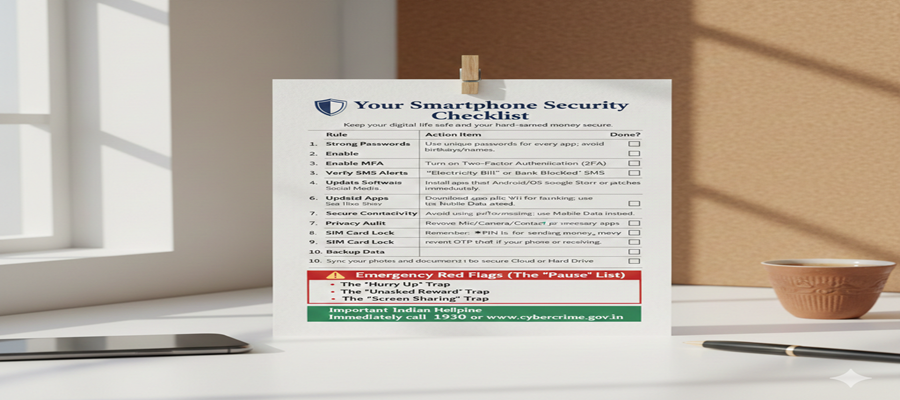
10 Cyber Safety Rules Everyone Using a Smartphone Must Follow
Let’s get practical. If you want to keep the scammers at bay and ensure your Network Security is solid, these are the ten commandments for your smartphone.
-
Stop Using Your Birthday as a Password:
We all love a password that’s easy to remember, but if it’s your birth year or “Pass@123,” you are basically leaving your front door wide open. A human-written password should be a weird phrase only you know. Think “I-love-PaniPuri@2026!” It’s long, complex, and much harder for a bot to crack. This is the foundation of
-
The Power of the “Double Lock” (MFA):
Multi-Factor Authentication is like having a gatekeeper outside your house who asks for an ID even if you have the key. Whether it’s an OTP or an authenticator app, always turn this on for WhatsApp, Gmail, and banking apps. It is the most effective way to block
-
Don’t Be an “Instant Clicker”:
When you see an SMS about a bill update, a bank account block, or a free iPhone, take a breath. Scammers count on your “fight or flight” response. Look at the sender’s number. Does it look like an official “AD-POWER” tag, or is it just a random 10-digit mobile number? If it’s a mobile number, it’s a scam. Always.
-
Updates Are Not Suggestions:
We all hate that “Update Software” pop-up when we are busy. But those updates often contain “security patches” that fix holes hackers are currently using to get into phones. Think of it as fixing a broken window in your house. Keep your OS and apps current to maintain
-
The “Mod” App Trap:
In India, many people download “GB WhatsApp” or “Free Movie” apps from random websites to get extra features. These apps are often digital Trojan horses. They might give you cool themes, but they are also reading your messages and stealing your banking data. Stick to the Play Store.
-
Public Wi-Fi is for Browsing, Not Banking:
Free Wi-Fi at the airport or railway station is great for checking the news, but never use it to log into your bank or make a UPI payment. Hackers can sit on the same network and “sniff” your data. If you have to pay for something, switch to your 5G/4G data.
-
Audit Your App’s “Greed”:
Why does a flashlight app need access to your microphone and contacts? It doesn’t. Every few months, go into your settings and see which apps have “permission” to see your private life. If an app asks for more than it needs, delete it. This is a huge part of personal
-
Lock Your SIM Like You Lock Your Phone:
If your phone gets stolen, the thief can put your SIM in another phone and use “Forgot Password” to reset your bank accounts via OTP. Go to your settings and set a “SIM PIN.” This way, the SIM won’t work in any phone without that code.
-
UPI is for Giving, Not Receiving (Usually):
This is a huge one for cyber frauds in India. If someone says, “Enter your PIN to receive your prize money,” they are lying. You never need a PIN to receive money. If you are typing your PIN, money is leaving your account. Period.
-
The “Cloud” is Your Safety Net:
Imagine losing your phone today. Would you lose all your family photos and contacts too? Regularly back up your data to Google Drive or iCloud. If you ever get hit by “Ransomware,” you can just wipe your phone and start over because your data is safe elsewhere.
Real-World Awareness: Identifying the Modern Indian Scammer
The landscape of cybercrime in India has shifted from clumsy emails to highly sophisticated social engineering. Scammers now use local dialects, pretend to be from the “Police” or “Customs,” and even use deepfake voices.
Take the “FedEx Scam” or “Digital Arrest” scam. You get a call saying a package in your name was caught with illegal items, and a “CBI officer” (on a fake Skype call) tells you to stay on camera while you transfer money for “verification.” No Indian law enforcement agency will ever “digitally arrest” you or ask for money over a video call.
How to Apply This Immediately
- Check your WhatsApp: Go to Privacy -> Groups -> Change to “My Contacts.” No more being added to “Investment” scam groups by strangers.
- Google Yourself: See what info is public. You’d be surprised how much a scammer can learn about you just from a public Facebook profile.
- The 10-Second Rule: Before clicking any link or giving an OTP, count to ten. It breaks the “panic loop” that scammers rely on.
Why You Are the Best Firewall
At the end of the day, all the Network Security in the world can’t help if you willingly give away your OTP. The most important of the 10 Cyber Safety Rules Everyone Using a Smartphone Must Follow is simply to trust your gut. If something feels too urgent, too scary, or too good to be true, it probably is.
Think of yourself as the captain of your digital ship. You have the tools, the rules, and the knowledge. By staying skeptical and keeping your software updated, you make yourself a “hard target.” Scammers want easy prey; don’t give them the satisfaction.
Conclusion
To wrap things up, your digital safety is entirely in your hands. We’ve covered the 10 Cyber Safety Rules Everyone Using a Smartphone Must Follow, from the basics of password hygiene to the specifics of avoiding Electricity Bill Update Scams. These aren’t just one-time chores; they are habits that will protect you from evolving Cyber Threats and cyber frauds.
India is becoming a digital superpower, but with great connectivity comes the need for great responsibility. Whether you are protecting your own bank account or teaching a younger sibling about Data Security, remember that awareness is contagious. If you follow these rules, you don’t just protect yourself—you help make the entire Indian internet ecosystem a little bit safer for everyone. Stay curious, stay skeptical, and most importantly, stay secure. The next time you get a “suspicious” SMS, you won’t be a victim; you’ll be the one who knew better.
Leave a Reply